AI in Practice: From Potential to Peak Performance
Master the Art of Practical AI Application
TL;DR:
AI works best when integrated into workflows with human oversight: add evaluation loops, set guardrails, understand limitations, and iterate—don't just prompt, build reliable systems that deliver real outcomes.

Academy review: October 5, 2026
Model names and capabilities change frequently. We use provider families (GPT, Claude, Gemini) in Academy copy — verify current tiers on provider sites or our LLM Model Family Guide.
For live model picks, cross-check with our LLM Comparison guide.
Where this course fits
This course: Shipping AI at work
Mindset, tool selection, workflows, and evaluation — turning fundamentals into daily habits.
Learn first (we do not repeat this here)
Go deeper after this course
- AI Security & Privacy — Data handling, agents, and compliance for production use.
Practice patterns for agent-heavy workflows
The jagged frontier still exists: AI helps most on tasks inside the model’s comfort zone. In 2026, add explicit human review for agent outputs, CSV-style batch work, and anything touching customers or code.
What we updated for 2026
- Human-in-the-loop is default for production — agents propose, humans approve.
- Batch structured work (tickets, logs, surveys) beats one-off magic prompts.
- Measure iteration quality (time saved, error rate), not output volume.
- Cross-link role guides when you need function-specific stacks.
Still true in 2026
- Studies citing “GPT-class” tools age quickly — focus on the workflow pattern, not the product tier label.
Compare live tools anytime in our tool explorer.
Where this course fits
This course: AI in practice
Real workflows, evaluation, and team habits — not tool hype.
Learn first (we do not repeat this here)
Go deeper after this course
- Prompt Engineering — Sharper inputs for practice workflows.
- AI Readiness — Org maturity before you scale.
Key Takeaways
Quick highlights from each concept
- Your Role When Working With AI: The BCG/HBS experiment shows a consistent pattern: AI can meaningfully improve outcomes on tasks inside its capability frontier, but can make you worse on tasks outside it if you over-trust confident-but-wrong output. Oversight isn’t a constraint — it’s what makes AI usable.
- How to Pick the Right AI Tool: The most hyped tool isn't always the right tool. Match it to your specific task, check if it integrates with your existing workflow, and verify it handles your data the way you need it to.
- Five AI Workflow Patterns — With Real Examples: Match the pattern to the task: one-pass for clear transformations, iterative for quality-critical outputs, parallel for large inputs, human-gate for consequential decisions, feedback loop for anything you run repeatedly.
- How to Actually Integrate AI Into Your Work: Build AI into your regular workflow, not just as a one-off tool. Define where it fits, write down how to use it, and plan for at least one round of human review on anything that matters.
- Where AI Gets It Wrong: Be a discerning AI user: critically evaluate outputs, understand that AI doesn't 'know' things like humans do, and always verify crucial information. AI is a powerful tool for augmentation, not an infallible truth machine. Recognizing limitations is key to harnessing its strengths.
Learning Outcomes
What you will be able to do
- Map AI to concrete workflow steps for measurable impact.
- Establish human-in-the-loop review and SOPs.
- Identify and mitigate limitations and bias in practice.
- Evaluate and select tools based on fit, trust, and integration.
Prerequisites
Recommended before you start
- Basic AI concepts (see AI Fundamentals).
- Optional: review the AI Glossary.
Sample Lesson Outline
- AI Co-Pilot mindset and roles
- Strategic tool selection checklist
- Workflow integration patterns and SOPs
- Limits, bias, privacy and ethics
- Measurement and iteration
Get Started
Your Role When Working With AI
Your role with AI — 2026 depth note
You are the editor, integrator, and accountable party. AI proposes; you verify, merge, and own outcomes — especially with agents in 2026.
- Set a team norm: no unreviewed AI output to customers or production.
- Define which tasks are assist-only vs. automate-with-approval.
- Celebrate time saved, not word count generated.
AI is genuinely useful — but it confidently produces wrong answers, misses context, and has no idea what matters in your situation. The people who get the most out of it are those who stay in the driver's seat.
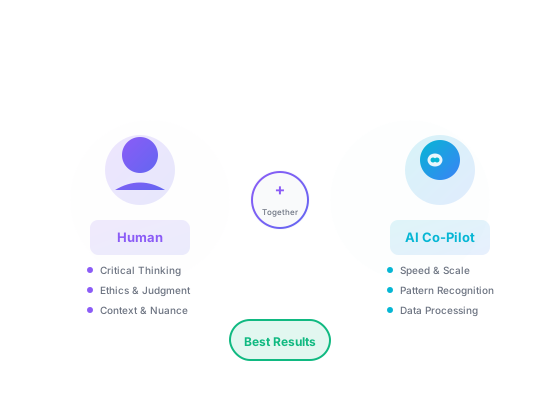
A widely cited field experiment with 758 BCG consultants using a GPT-class model found that for tasks within today's AI capability frontier, consultants with access to GPT completed more tasks, finished faster, and produced higher-quality work; but for a task selected to be outside the frontier, the AI-assisted group was less likely to reach the correct solution. Source (HBS working paper).
That's the whole game. Not "use AI" or "don't use AI." Know where it's good and where it isn't, and stay in charge of the judgment calls. In practice, that means:
- You set the goal and evaluate the output. AI is fast at generating — you bring the judgment about whether what it generated is actually correct, appropriate, and complete. Learn to write prompts that make evaluation easier.
- You provide context it can't have. AI doesn't know your specific situation, your client's history, your company's constraints, or what happened in the meeting last Thursday. The more context you feed it, the more relevant the output.
- You check claims before you rely on them. LLMs generate plausible text, not verified facts. Any specific claim worth acting on is worth verifying. This is non-negotiable for anything consequential. Keep sensitive data out of consumer chatbots (see AI Security & Privacy), and check EU rules in AI & the Law.
- You iterate, not just accept. First output is a starting point. The difference between mediocre and excellent AI-assisted work is often a few cycles of feedback and refinement.
- You handle the ethical judgment. AI can't weigh competing interests, organizational values, or the full consequences of a decision. You can, and must. See AI Ethics Frameworks.
None of this makes AI less valuable. It makes you more valuable — because you're the part of the system that's actually thinking. See AI Fundamentals for why LLMs behave this way at a technical level.
How to Pick the Right AI Tool
Choosing tools — 2026 depth note
Pick by workflow fit, data residency, and integration — not leaderboard rank. Cap overlapping chat subscriptions.
- Run a 30-minute eval: same 10 prompts across two families.
- Prefer tools with SSO, retention controls, and audit logs for work use.
- Link to Free vs Paid and LLM Comparison before you standardize.
The tool that works for your colleague's use case might be wrong for yours. Match the tool to your specific task, required accuracy level, and how it fits into your existing workflow.
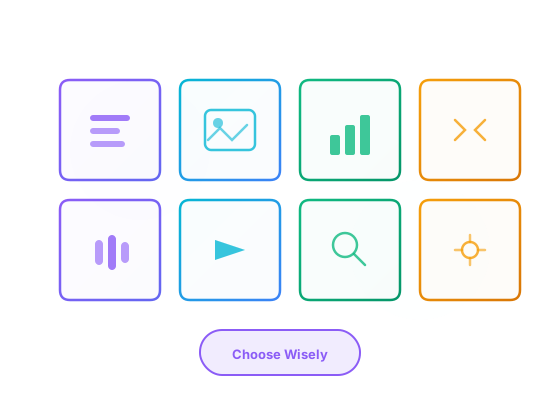
New AI tools launch every week. Most of them solve the same problems in slightly different ways. Here's what actually matters when choosing:
- Task Specificity & Desired Outcome:
- Define the problem first. Is it highly specialized (medical image analysis, legal document review) or general (writing a blog post, brainstorming ideas)? Specialized tools usually beat general-purpose LLMs for niche tasks.
- What is the ideal output? Does the task require high factual accuracy (e.g., research summaries), creative generation (e.g., marketing slogans), data analysis, or automation of a process?
- Input/Output Needs: What kind of data will you provide (text, images, code, structured data)? What format do you need the output in (plain text, JSON, specific file types, an image, a video)? Ensure the tool supports your data ecosystem and desired output formats.
- Ease of Use vs. Customization & Control:
- Are you looking for a plug-and-play solution with a simple interface, or do you need fine-grained control over parameters and advanced customization options (which might require more technical expertise or prompt engineering skills)?
- Many tools listed on Best-AI.org indicate their usability. Consider your team's technical proficiency.
- Integration Capabilities: Does the tool need to integrate with your existing software stack (e.g., CRM, IDE, project management tools, cloud storage)? Check for available APIs, plugins, or native integrations to ensure a smooth workflow. Learn more about API integrations in our ChatGPT Mastery course.
- Cost-Benefit Analysis & Scalability:
- Evaluate free, freemium, and paid options. When does a paid tool offer sufficient value (time savings, quality improvement, unique features) to justify the cost?
- Consider usage limits (e.g., words/month, images/month, API calls), per-user fees, and the scalability of pricing plans as your needs grow.
- Accuracy, Reliability & Trustworthiness: For tasks requiring factual precision, investigate the tool's reputation for accuracy. Look for information on its training data, knowledge cutoff, and mechanisms for citing sources or indicating confidence levels. Read reviews and case studies if available. Understand how LLMs work in our AI Fundamentals course.
- Data Privacy & Security: How does the tool handle your input data? Is it used for retraining their models by default? Where is data stored? Are there options for on-premise deployment or private instances for sensitive information? Read the tool's privacy policy and terms of service before uploading anything confidential. (Refer to our Legal Page for our site's policies). Learn about GDPR and data privacy in our AI Fundamentals course.
- Community & Support: Is there active community support (forums, Discord), good documentation, tutorials, and responsive customer service? This can be crucial for troubleshooting, learning advanced features, and getting the most out of the tool.
Our AI Explorer Guide provides detailed strategies on how to use the search and filter functions on Best-AI.org to narrow down your options based on these criteria. For example, you can filter by category, pricing, or specific tags indicating features like 'API access' or 'GDPR compliant'.
Five AI Workflow Patterns — With Real Examples
Universal workflows — 2026 depth note
Summarize, transform, extract, and brainstorm are the four durable patterns. Batch structured inputs (CSV, logs) for the best ROI.
- Extract → validate → act: never skip validation on numbers and names.
- Reuse templates from Prompt Patterns instead of one-off chats.
- Log prompts that worked for quarterly refresh.
Most AI use cases fall into one of five patterns. Knowing which pattern fits your task tells you what to expect, where to add human review, and how many iterations to plan for.
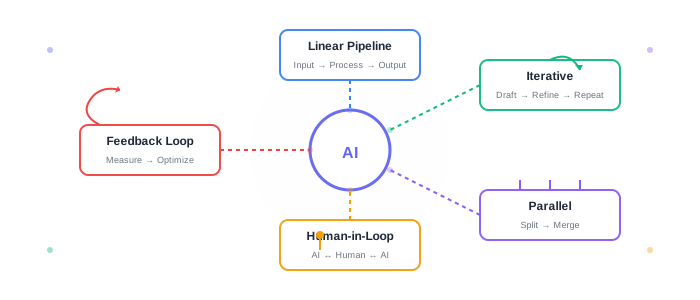
Abstract workflow theory doesn't help much until you see it in action. Here are five common patterns you'll see again and again in real AI integrations — each with a concrete scenario.
1. Linear Pipeline — one-pass transformation
Input → AI processes it → output → human reviews. One pass, one direction.
Real example: A marketing manager exports 200 customer support tickets to a CSV, pastes them into Claude, and asks: "Categorize these by complaint type and count occurrences of each. Output a ranked list." Claude returns a categorized summary in 30 seconds. The manager checks the top categories make sense, then pastes them into a slide deck for the product team.
When to use it: Any time your input is ready and you want a structured output. Works best when the task has a clear right answer you can verify.
2. Iterative Refinement — draft, critique, improve
Generate a first version, give feedback, regenerate. Usually 2–4 cycles.
Real example: A developer describes a function in plain English, asks GitHub Copilot to write it, runs the code, gets a TypeError on line 12, pastes the error back: "This returns a TypeError when the input list is empty. Fix it and add a guard clause." Gets a corrected version. Runs it again. Works. Total time: 8 minutes instead of 45.
Key insight: Most people stop at the first output. The second or third version is usually where the value actually is. Plan for at least 2 iterations on any non-trivial task.
3. Parallel Processing — split a large task, then combine
Divide the input into chunks, process each separately, synthesize the results.
Real example: A researcher has a 60-page report that is too long to process reliably in one pass or cheaper to handle in chunks. They split it into 6 sections of 10 pages each, run the same prompt against each: "Summarize the key findings and any data points mentioned in this section." They get 6 summaries, then run one final pass: "Combine these 6 section summaries into one coherent executive summary."
When to use it: Long documents, large datasets, or any time you need multiple independent outputs that will be combined.
4. Human Judgment Gate — AI shortlists, human decides
AI handles the volume work; a human makes every consequential decision.
Real example: A recruiter receives 300 applications. They use an AI screening tool to rank candidates by keyword match and experience alignment, reducing the list to 30. The recruiter then reads every one of those 30 personally before deciding who gets an interview. AI did the narrowing; the recruiter makes the call. (This is also exactly how Amazon's failed hiring AI should have been deployed.)
When to use it: Any decision with real consequences for real people — hiring, medical triage, legal review, financial recommendations.
5. Feedback Loop — measure output quality, improve the prompt
Run the workflow, track what the outputs actually achieve, adjust accordingly.
Real example: A content team uses Claude to write weekly LinkedIn posts. After 8 weeks, they compare engagement rates: posts from prompts that specified tone ("conversational, first person, one concrete example per post") got 3× more comments than posts from generic prompts. They update their standard prompt template and see immediate improvement on the next batch.
Key insight: The prompt that worked last month may not be the best prompt today. Models update, your audience changes, your goals shift. Treat your prompts as living documents.
One practical rule for all five patterns:
Never ship AI output without at least a quick sanity check. The faster the task, the less review you need — but zero review is how confident-sounding wrong answers get sent to clients.
Patterns outlast tools
How to Actually Integrate AI Into Your Work
Integration — 2026 depth note
AI earns its keep when it sits inside CRM, IDE, or ticketing — not in a separate tab you forget to check.
- Automate handoffs (Zapier, Make, native integrations) only after manual proof.
- Agents need kill switches and scoped credentials.
- Measure cycle time, not feature count.
Most people use AI as a one-off tool — paste something in, get something out, done. The bigger gains come from building it into your regular process so it runs in the background, consistently.

Using AI occasionally is one thing. Building it into your regular workflow so it runs consistently is where the real gains are. Here's how:
- Identify Bottlenecks & Repetitive Tasks: Analyze your current processes. Where do you spend the most time on tasks that are repetitive, data-intensive, or could benefit from creative brainstorming or rapid first-drafting? These are prime candidates for AI augmentation.
Examples: Drafting initial email responses, transcribing meeting audio, generating boilerplate code, summarizing long reports, creating variations of marketing copy, data entry, preliminary research. - Start Small & Iterate: Don't try to overhaul everything at once. Begin with one or two specific, well-defined tasks or a single part of a workflow. Experiment with an AI tool, measure its impact (time saved, quality improved), gather feedback, and then gradually expand its use or try other tools.
- Define Clear AI Roles within the Workflow: Determine precisely at which stage(s) AI will contribute and what its specific role will be. This clarity is key to effective human-AI collaboration.
- Ideation/Brainstorming: AI generates ideas, outlines, or initial concepts (e.g., blog topics, ad angles). Learn effective prompting techniques in our Prompt Engineering course.
- First Draft Generation: AI creates the initial version of content, code, or analysis (e.g., a first draft of a product description). See practical examples in our ChatGPT Mastery course.
- Data Processing/Analysis: AI sifts through data, identifies patterns, performs calculations, or extracts key information (e.g., sentiment analysis of customer reviews).
- Refinement/Editing: AI assists with grammar, style, tone, code optimization, or suggesting alternative phrasings.
- Automation: AI handles routine communication, scheduling, data entry, or report generation.
- Write Down How to Use It: Create clear guidelines: how the tool should be used for specific tasks, what level of human review is required, and how to handle common issues (e.g., fact-checking AI-generated content). Learn about AI hallucinations and how to verify outputs in our AI Fundamentals course.
- Train Your Team: If you're rolling this out to a team, train them on the chosen tools, best practices (including basic prompt skills), data privacy rules, and ethical guidelines. Make sure everyone understands they need to stay in charge of the judgment calls. Start with our Prompt Engineering course.
- Manage AI-Generated Assets: Establish clear processes for storing, versioning, fact-checking, editing, and approving AI-generated content or code before it's used in production or client-facing materials. Define ownership and responsibility.
- Focus on Augmentation, Not Just Automation: Look for ways AI can free up people to focus on tasks that require human judgment, empathy, or relationship-building — the things AI can't do.
- Monitor, Evaluate, & Adapt: Continuously evaluate the effectiveness of AI integration. Are you seeing the desired time savings, quality improvements, or innovation boosts? Be prepared to adapt your tools, prompts, and processes as AI technology evolves and as you learn more about what works best for your specific context.
Example Content Creation Workflow with AI:
- Human: Define blog topic, target audience, primary keywords, desired tone, and core message.
- AI: Generate multiple blog post outlines and headline suggestions based on human input.
- Human: Select and refine the best outline, choose a headline.
- AI: Draft the first version of the blog post based on the refined outline.
- Human: Thoroughly review, fact-check, edit for voice/style, add unique insights, personal anecdotes, ensure factual accuracy, and optimize for SEO. Critically, ensure the content aligns with brand values and ethical standards.
- AI (Optional): Suggest alternative phrasings for tricky sentences, generate social media snippets based on the human-edited version, or check for grammar/clarity one last time.
- Human: Final approval and publication.
Where AI Gets It Wrong
Limits & bias — 2026 depth note
Models confabulate, drift on edge cases, and reflect training bias. The jagged frontier means superhuman on some tasks, brittle on neighbors.
- Red-team prompts that handle user-generated content.
- Never use AI alone for legal, medical, or safety-critical decisions.
- Pair with AI Critical Thinking and Security courses for teams.
AI confidently produces wrong answers, misses context, and reflects the biases in its training data. Knowing where it fails helps you catch errors before they become problems.
AI outputs look polished and confident. That doesn't mean they're correct. These tools reflect the data they were trained on and the algorithms that power them. Here's where they commonly fail:
- AI "Hallucinations" (Fabricated Information): Generative AI models, especially LLMs, can sometimes produce "hallucinations" - outputs that are fluent, confident-sounding, and grammatically correct, but are factually inaccurate, nonsensical, or not grounded in the provided input data. They might invent sources, misstate facts, or create details that seem plausible but aren't true.
Mitigation: Always critically evaluate and independently verify any factual claims, statistics, or critical information generated by AI, especially if it's for important decisions, academic work, or public content. Cross-reference with reliable sources. Develop a healthy skepticism. Learn more about how AI models work in our AI Fundamentals course. - Algorithmic Bias: AI models learn from the data they are trained on. If this data reflects historical or societal biases (e.g., related to gender, race, age, culture, socioeconomic status), the AI can inadvertently learn, perpetuate, and even amplify these biases in its outputs or decision-making processes. This can lead to unfair or discriminatory outcomes.
Mitigation: Be aware of potential biases in AI-generated content or suggestions. Question outputs that seem to reinforce stereotypes or offer skewed perspectives. If developing AI, strive for diverse and representative training data and implement fairness auditing. For users, selecting tools from vendors who are transparent about bias mitigation efforts can be beneficial. Learn more about ethical AI and bias in our AI Fundamentals course. - Knowledge Cutoff Date: Most LLMs have a "knowledge cutoff date," meaning their training data only extends up to a certain point in time (e.g., "knowledge up to early 2025"). They will generally not be aware of events, discoveries, product releases, or information that emerged after this date unless they have specific, real-time web browsing capabilities (which some are starting to integrate, but even then, coverage can be incomplete).
Mitigation: For up-to-the-minute information or topics related to recent events, always supplement AI-generated content with current research from reliable, up-to-date sources. Don't rely on an LLM for the very latest news, stock prices, or fast-changing information without verification. Understand how training data works in our AI Fundamentals course. - Lack of True Understanding & Common Sense: Current AI models excel at pattern recognition, statistical prediction, and language manipulation based on their training. They do not possess genuine human-like understanding, consciousness, emotions, or nuanced common-sense reasoning in the way humans do. Their "knowledge" is derived from correlations in data, not from lived experience or a true comprehension of cause and effect in the real world. They can't truly "understand" the implications of what they generate.
Mitigation: Apply your own common sense, domain expertise, and critical judgment to AI outputs. Be wary if an AI suggestion seems illogical, impractical, or completely out of touch with real-world practicalities, even if phrased eloquently. Question the "why" behind AI suggestions. Learn how Machine Learning works in our AI Fundamentals course. - Context Window Limitations: AI models have a finite "context window" – the amount of information (previous parts of the conversation, provided documents) they can "remember" and consider at any one time. For very long conversations or when processing extremely large documents, they might "forget" earlier details or lose track of the overarching narrative, leading to inconsistencies or a loss of context in their responses. Newer models generally have larger context windows, but limitations always exist.
Mitigation: For long tasks, break them into smaller, manageable chunks. Periodically re-summarize key context for the AI if the interaction is lengthy. Be aware of the specific model's context limitations if using an API or a particular tool. Learn how to manage context effectively in our ChatGPT Mastery course. - Difficulty with Nuance, Sarcasm, and Ambiguity: While improving, AI can still struggle to perfectly interpret subtle human communication nuances like sarcasm, irony, implied meanings, cultural references, or highly ambiguous phrasing. This can lead to misinterpretations or overly literal responses.
Mitigation: Be as clear, direct, and unambiguous in your instructions (prompts) as possible, especially when dealing with potentially ambiguous topics or when a specific nuanced interpretation is required. If a response seems off, try rephrasing your input to be more explicit or provide clearer contextual cues. - No Real-World Experience or Grounding: AI models learn from data, but they don't have lived experiences, physical interactions with the world, or the sensory input humans use to ground their understanding. This can lead to outputs that are theoretically plausible but practically unworkable or lacking a deep understanding of real-world constraints.
Mitigation: Always consider the practical applicability of AI suggestions. Combine AI's data-processing power with your real-world experience and intuition.
A "healthy skepticism" and a commitment to human verification are essential when working with any AI tool. Use AI as a powerful assistant and a co-pilot, but always retain your critical judgment and domain expertise. Understanding these limitations helps you set realistic expectations and use AI more strategically.
Ethical AI Use: A Non-Negotiable Aspect of Practice
Ethical AI use isn't a box to check — it's a set of decisions you make every time you run a workflow. The questions that matter:
- Data Privacy & Consent: Be acutely aware of the data you input into AI tools, especially if it's personal, confidential, or sensitive. Understand the tool's data handling, storage, and usage policies. Never use sensitive data without explicit consent or proper anonymization where applicable.
- Intellectual Property & Copyright: Be mindful of copyright implications for AI-generated content. Understand the terms of service of the AI tool regarding ownership of outputs. Avoid infringing on existing IP when providing input data for training or generation.
- Authenticity and Disclosure: Transparency is key. Consider when and how to disclose the use of AI in your work, especially in creative fields, academic writing, or client deliverables. Avoid misrepresenting AI-generated content as purely human-created.
- Bias Mitigation in Application: Actively look for and try to counteract biases in AI outputs that could lead to unfair or discriminatory outcomes in your specific application. For example, if using AI for shortlisting candidates, ensure the criteria and AI outputs are reviewed for fairness.
- Accountability & Responsibility: Ultimately, you are responsible for the outputs you use from AI tools. Do not abdicate your professional judgment or accountability to the AI. Thoroughly review and validate any AI-generated content before it impacts decisions or is published.
For a deeper dive into the broader ethical landscape, explore our AI Ethics Frameworks course.
You are an AI workflow consultant. I want to integrate AI into my [ROLE/DEPARTMENT] workflow.

Current pain points:
1. [Describe repetitive task #1]
2. [Describe bottleneck #2]
3. [Describe quality issue #3]

For each pain point, suggest:
- Which type of AI tool would help (generative, analytical, automation)
- A specific tool recommendation
- Expected time savings (hours/week)
- Risk level (low/medium/high) and mitigation strategy
- How to measure success after 30 days

Format as a table with columns: Pain Point | AI Solution | Tool | Time Saved | Risk | Success Metric
Build Your AI Workflow
Integrate these tools into your daily work for maximum productivity
Build Your First AI Workflow
AI Explorer
Learn to search, filter, and compare AI tools for any use case
Start LearningAudit your current AI workflow
- 1List 3 tasks you currently do manually that could benefit from AI assistance. For each, estimate time spent per week.
- 2For the highest-time task: Which AI tool could help? What would the workflow look like? (Input → AI step → Human review → Output) Find the Right Tool
- 3Design a simple evaluation loop: How will you verify the AI output is correct? What's your fallback if it fails?
- 4Try it for one week. Track: time saved, quality of output, number of corrections needed, and any unexpected failures.
- 5Write a 3-sentence verdict: Was it worth it? What would you change? Would you recommend it to a colleague?
Ready to Command AI with Precision?
You've now explored the practicalities of using AI and integrating it into your workflows. The next vital skill is mastering the art of communication with these intelligent systems. Learn how to craft prompts that elicit exactly the responses you need.
Key Insights: What You've Learned
AI integration requires systematic workflows beyond prompting: add evaluation loops to verify outputs, set guardrails for safety and quality, understand limitations to avoid overreliance, and iterate continuously to improve results.
Build reliable AI systems by combining human judgment with AI capabilities—use AI for augmentation, not replacement, maintain oversight for critical decisions, and design workflows that leverage both strengths while mitigating weaknesses.
Success comes from treating AI as a powerful tool in your toolkit: match tools to tasks, verify outputs, respect ethical boundaries, and continuously refine your approach based on real-world outcomes and feedback.
Risks & Responsible Use
Know these before you go further.
Shipping Without Evaluation Loops
Teams that deploy AI workflows without measuring quality regressions often discover problems only after customer complaints or compliance reviews — when fixes are expensive.
What this means for you
Define success metrics before launch: accuracy, latency, human edit rate, or customer satisfaction. Re-evaluate when models or prompts change.
Shadow AI in Organizations
Employees adopt unsanctioned AI tools to move faster, pasting company data into consumer products. This is one of the fastest-growing sources of enterprise data leaks.
What this means for you
Provide approved tools and clear policies. Make the sanctioned path easier than the shadow path — not just forbidden.
No Guardrails on High-Stakes Outputs
AI drafts for legal, medical, HR, or financial communications can sound professional while containing critical errors. Uniform tone creates a false sense of review.
What this means for you
Route high-stakes outputs through domain experts. Use AI for drafts and research, not final sign-off.
Vendor Lock-In & Model Dependency
Workflows tightly coupled to one provider's API, prompt format, or proprietary features become costly to migrate when pricing, policies, or quality change.
What this means for you
Abstract prompts and evaluation logic from vendor-specific APIs where possible. Maintain a fallback model for critical paths.
Test Your Knowledge
Complete this quiz to test your understanding of AI in practice.
Loading quiz...
Copyright & Legal Notice
© 2026 Best-AI.org. All rights reserved.
All content on this page, including text, summaries, explanations, and images, has been created and authored by Best-AI.org. This content represents original works and summaries produced by our editorial team.
The materials presented here are educational in nature and are intended to provide accurate, helpful information about artificial intelligence concepts and applications. While we strive for accuracy, this content is provided "as is" for educational purposes only.