From LLMs to Autonomous Systems
TL;DR:
AI agents go beyond chat: they perceive, reason, plan, act, and learn in a loop. This course covers the architecture that makes agents tick, compares 9 major frameworks and platforms (LangChain, LangGraph, CrewAI, AutoGen, LlamaIndex, Semantic Kernel, OpenAI Agents SDK, Google ADK, Dify / n8n AI; including what Microsoft Agent Framework changed for AutoGen and Semantic Kernel), walks through proven production use cases, and gives you a production checklist so your first agent doesn't become an expensive hallucination machine.
This course is for developers, product managers, and technical decision-makers who hear “AI agents” everywhere and want to understand what they actually are, when they're worth building, and how to avoid the most common pitfalls. It's also for founders and team leads evaluating agent frameworks for their products.
You should be comfortable with basic AI concepts (AI Fundamentals) and have used an LLM like ChatGPT or Claude. No coding experience is required — code examples are in pseudocode.
Developers & Engineers
Product Managers
Founders & Decision-Makers
Agent vs LLM
Understand the fundamental difference between a stateless LLM and an autonomous agent with memory, planning, and tool use.
Agent Architecture
Master the Perceive-Reason-Plan-Act-Learn loop and the 6 core components every agent needs.
Framework Landscape
Compare LangChain, LangGraph, CrewAI, Microsoft Agent Framework, and more — and know which to pick for your use case.
Real-World Use Cases
Study 5 common production use cases and their workflows: customer support, code review, research, maintenance, recruitment.
Build Your First Agent
Walk through a complete agent design — from goal decomposition to tool selection to error handling.
Production Readiness
Ship agents safely with observability, guardrails, human-in-the-loop escalation, and cost controls.

Academy review: October 6, 2026
Model names and capabilities change frequently. We use provider families (GPT, Claude, Gemini) in Academy copy — verify current tiers on provider sites or our LLM Model Family Guide.
For live model picks, cross-check with our LLM Comparison guide.
Ready to go beyond a single agent? Continue with Agent Orchestration, run models privately with Local AI, and compare tools in the Compare Hub.
Agents are mainstream in dev tools (Cursor, Claude Desktop, custom runtimes). MCP standardizes tool wiring — but observability, kill switches, and human approval remain non-optional.
What we updated for 2026
Still true in 2026
Compare live tools anytime in our tool explorer.
This course: AI agents
Architecture, frameworks, MCP, and production guardrails.
Learn first (we do not repeat this here)
Go deeper after this course
October 2026 update: agent principles outlast framework churn
The tooling landscape moved fast: Anthropic now points readers from its 2024 agent guide toward newer managed-agent tooling, and Microsoft Agent Framework is the successor path for AutoGen and Semantic Kernel users. Keep the durable pattern — simple workflows first, tools with clear interfaces, tracing, evals, and human approval for risky actions.
Primary sources: Anthropic agent guidance and Microsoft Agent Framework overview.
What are agents? — 2026 depth note
Agents = LLM + planner + tools + feedback. They trade single-shot simplicity for autonomy — and new failure modes.
A standard LLM is stateless: you send a prompt, it returns a response, done. It doesn't remember what happened before, can't use tools, and can't break a complex goal into steps. Think of it as an extremely well-read expert sitting in a room — brilliant at answering questions, but unable to leave the room, open a browser, or check a database.
An AI agent is that expert plus a planner, a toolbox, and a feedback loop. It can perceive its environment, reason about goals, plan multi-step actions, execute them using external tools (APIs, databases, code), and learn from the results. The key difference: agents act autonomously toward a goal, while LLMs react to a single prompt.
The one-sentence test
Level 1: Plain LLM
Single prompt → single response. No memory, no tools, no planning. Example: "Summarize this email."
Best for: Simple Q&A, text generation, translation, classification.
Level 2: Single Agent
Goal → plan → tool calls → iteration → result. Has memory, can use APIs, adapts based on feedback. Example: "Research the top 3 competitors and write a comparison report."
Best for: Multi-step tasks, research, data analysis, customer support.
Level 3: Multi-Agent System
Multiple specialized agents collaborate. A "Researcher" agent finds data, an "Analyst" agent interprets it, a "Writer" agent drafts the report. They coordinate via an orchestrator.
Best for: Complex workflows, enterprise automation, creative pipelines.

From “Building Effective Agents” — the most influential guide in the industry.
Anthropic draws a crucial distinction: workflows are systems where LLMs and tools follow predefined code paths. Agents are systems where the LLM dynamically directs its own process. Most tasks need a workflow, not an agent.
1. Prompt Chaining
A fixed sequence of LLM calls, each processing the output of the previous one. Add programmatic gates between steps to verify quality.
Example: Generate marketing copy → Translate to German → Check brand guidelines
When: Task can be cleanly decomposed into fixed subtasks. You trade latency for accuracy.
2. Routing
Classify the input and direct it to a specialized handler. Each handler has its own optimized prompt and tools.
Example: Customer query → Classify (refund / technical / general) → Route to specialist prompt
When: Distinct categories that need different handling. Optimizing for one category hurts another.
3. Parallelization
Run the same task multiple times (voting) or split it into independent parts (sectioning) and aggregate results.
Example: Code review: one LLM checks security, another checks style, a third checks logic — aggregate findings
When: Speed matters, or you need multiple perspectives for higher confidence.
4. Orchestrator-Workers
A central LLM dynamically breaks down the task and delegates to worker LLMs. Unlike parallelization, subtasks aren't predefined.
Example: Coding agent: orchestrator analyzes PR, decides which files to change, delegates each file edit to a worker
When: You can't predict the subtasks upfront. The orchestrator figures it out at runtime.
5. Evaluator-Optimizer
One LLM generates a response, another evaluates it and provides feedback, looping until quality is sufficient.
Example: Literary translation: translator LLM drafts → evaluator LLM critiques nuances → translator revises → repeat
When: Clear evaluation criteria exist, and iterative refinement provides measurable value.

Anthropic's golden rule
Not every AI task needs an agent. In fact, most don't. A useful reality check is LangChain's State of Agent Engineering (2026): agents are increasingly in production, but teams still cite quality, security, and latency as top blockers. Practically, agents shine most when a task requires multi-step work plus tool use.
Customer Service
Multi-turn conversations with tool lookups and escalation decisions
Research & Data Analysis
Synthesizing information across multiple sources with reasoning
Internal Automation
Workflow orchestration across multiple systems and APIs
Anti-pattern: Agent for everything
Agent architecture — 2026 depth note
Plan → act → observe loops dominate 2026 stacks. Memory and state turn chats into workflows.
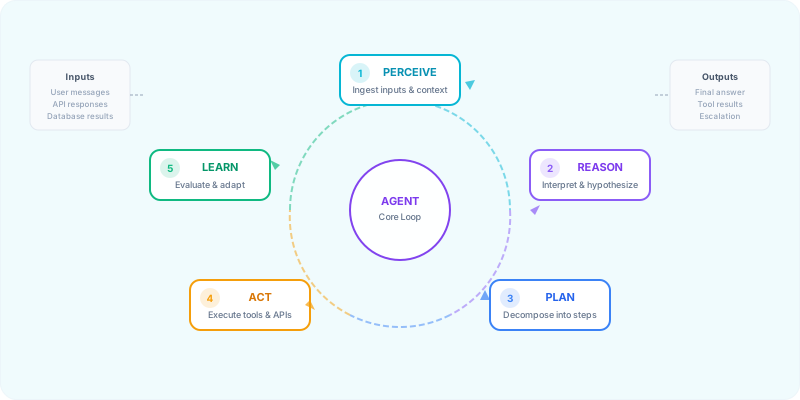
Every AI agent — regardless of framework — follows the same fundamental loop. We call it PRPAL (Perceive → Reason → Plan → Act → Learn). Understanding this loop is the single most important concept in this course, because it explains why agents succeed, why they fail, and where to intervene.
1. Perceive
Ingest inputs: user messages, API responses, database results, sensor data. The agent builds a representation of its current state.
2. Reason
Interpret context, form hypotheses, evaluate constraints. This is where the LLM backbone does its work — understanding what the user wants and what the current situation is.
3. Plan
Decompose the goal into sub-tasks. Decide which tools to use, in what order, and what to do if a step fails. This is the "thinking before acting" phase.
4. Act
Execute the plan: call APIs, run code, query databases, send messages. Monitor execution for errors and deviations.
5. Learn
Evaluate results against the original goal. Update memory, adjust strategy, and decide: Are we done, or do we loop back to step 1?
Under the hood, every agent is built from six interconnected modules. Some frameworks expose them explicitly; others hide them behind abstractions. But they're always there.
Perception Module
Ingests raw data (text, images, API responses) and transforms it into structured representations the agent can reason over.
Planning Engine
Breaks goals into ordered sub-tasks. Uses reasoning frameworks like ReAct or Plan-and-Execute to evaluate possible actions.
Memory Store
Short-term (conversation context) + long-term (vector DB). Enables the agent to remember past interactions and learn over time.
Tool Executor
Interfaces with APIs, databases, code interpreters, and external services. This is what gives agents their "hands."
Learning Module
Evaluates outcomes, processes feedback, and updates the agent's strategy. Enables self-improvement across iterations.
Orchestrator
Manages state, handles errors, enforces guardrails, and coordinates the other 5 modules. The "brain stem" of the agent.
How an agent decides what to do next is determined by its reasoning pattern. These are the three most important patterns you'll encounter:
ReAct (Reasoning + Acting)
The agent alternates between thinking (reasoning about what to do) and acting (executing a tool call), then observes the result before thinking again. This is the most common pattern and the default in LangChain.
Flow: Thought → Action → Observation → Thought → Action → ... → Final Answer
Plan-and-Execute
The agent creates a complete plan upfront, then executes each step sequentially. Better for complex, multi-step tasks where you want predictability. Used in LangGraph and some CrewAI setups.
Flow: Goal → Full Plan → Execute Step 1 → Execute Step 2 → ... → Final Answer
Reflection / Self-Critique
After generating an output, the agent critiques its own work and iterates. Dramatically improves quality for writing, code generation, and analysis tasks.
Flow: Draft → Self-Critique → Revised Draft → Self-Critique → ... → Final Answer
You are a helpful research assistant with access to the following tools:
{tools}

To answer the user's question, use this exact format:

Thought: I need to figure out [what you're thinking]
Action: [tool_name]
Action Input: [input for the tool]
Observation: [result from the tool — you'll receive this]

...repeat Thought/Action/Observation as needed...

Thought: I now have enough information to answer.
Final Answer: [your complete answer to the user]

Important rules:
- Always start with a Thought.
- Never make up tool results — wait for the Observation.
- If a tool fails, explain why and try a different approach.
- Limit yourself to {max_iterations} iterations.

User question: {question}
Memory is what separates a stateless LLM from a persistent agent. There are three types of memory an agent can use:
Short-Term Memory
Current conversation context. Lives in the context window. Lost when the session ends.
Long-Term Memory
Stored in a vector database. Persists across sessions. Used for user preferences, past interactions, learned facts.
Procedural Memory
How to do things: tool usage patterns, successful strategies, learned workflows. Often encoded in system prompts or fine-tuned weights.
Frameworks & MCP — 2026 depth note
LangGraph, CrewAI, and MCP standardize wiring — not governance. Least-privilege APIs still win.
Each framework has a sweet spot. Picking the wrong one costs weeks.
Swipe sideways to see all columns →
| Framework | Best For | Multi-Agent | Enterprise | Complexity |
|---|---|---|---|---|
| LangChain | General purpose, prototyping | ⚠️ | ✅ | Medium |
| LangGraph | Complex stateful workflows | ✅ | ✅ | High |
| CrewAI | Role-based agent teams | ✅✅ | ⚠️ | Low |
| AutoGen † | Conversational multi-agent | ✅ | ✅ | Medium |
| LlamaIndex | Data-heavy RAG workflows | ⚠️ | ✅ | Medium |
| Semantic Kernel † | .NET / Enterprise | ⚠️ | ✅✅ | Medium |
| OpenAI Agents SDK | Lightweight agents with handoffs and guardrails | ✅ | ✅ | Low |
| Google ADK | Multi-agent systems, Gemini / Google Cloud first | ✅ | ✅ | Medium |
| Dify / n8n AI | No-code / visual agent workflows | ⚠️ | ⚠️ | Low |
† AutoGen is in maintenance mode, Semantic Kernel is now Microsoft Agent Framework
The two newest entries are vendor SDKs: the OpenAI Agents SDK (agents, handoffs, guardrails) and Google's Agent Development Kit (ADK). Ratings in the table are our editorial summary, not benchmarks.
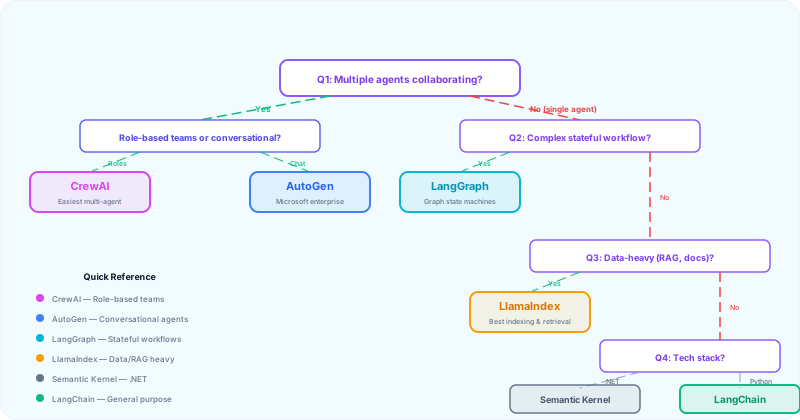
Answer 4 questions to find your framework.
Q1: Do you need multiple agents collaborating?
Yes, role-based teams → CrewAI (low-complexity multi-agent setup)
Yes, conversational agents → Microsoft Agent Framework (agents talk to each other; successor to AutoGen, which is in maintenance mode)
No, single agent → Continue to Q2
Q2: How complex is your workflow?
Complex, stateful, with branching → LangGraph (graph-based state machines)
Standard, linear → Continue to Q3
Q3: Is your task data-heavy (RAG, document analysis)?
Yes → LlamaIndex (best indexing and retrieval)
No → Continue to Q4
Q4: What's your tech stack?
.NET / Microsoft ecosystem → Microsoft Agent Framework (successor to Semantic Kernel)
Python / General → LangChain (largest ecosystem, most tutorials)
No-code / Quick prototype → Dify / n8n AI (visual workflow builders)
Framework ≠ magic
Architecture is timeless; frameworks are temporary
Anthropic's most underrated insight: tool design matters as much as prompt design.
An agent without tools is just an LLM with extra steps. Tools are what make agents useful. Every framework supports tool integration, but the patterns differ:
API Tools
REST/GraphQL endpoints: search engines, weather, CRM, databases. The most common tool type.
Code Execution
Run Python/JS code in a sandbox. Essential for data analysis, calculations, and file manipulation.
Database Tools
SQL queries, vector DB searches (Pinecone, Weaviate, Chroma). Critical for RAG and data-heavy agents.
Human-in-the-Loop
Ask a human for approval or input when confidence is low. The most underrated "tool" in production agents.
The ACI Principle (Agent-Computer Interface)
Anthropic spent more time optimizing tools than prompts when building their SWE-bench agent. Their key insight: treat tool design like UX design. Just as you invest in Human-Computer Interfaces (HCI), invest equally in Agent-Computer Interfaces (ACI).
• Make it obvious: If you'd need to think carefully about how to use the tool, so will the LLM. Add examples and edge cases to the description.
• Poka-yoke your tools: Design parameters so mistakes are impossible. Use absolute paths instead of relative ones. Validate inputs.
• Test with real inputs: Run many examples to see what mistakes the model makes, then iterate on the tool definition.
• Keep format natural: Use formats the model has seen in training data. Avoid formats that require counting lines or escaping strings.
# Define a tool for your agent
tool_name: "search_company_database"
description: "Search the internal company database for customer records, orders, or product information. Use this when the user asks about specific customers, orders, or products."
parameters:
  query:
    type: string
    description: "The search query — can be a customer name, order ID, or product name"
    required: true
  limit:
    type: integer
    description: "Maximum number of results to return (default: 5)"
    required: false
returns: "A JSON array of matching records with id, name, and relevant fields"
error_handling: "If no results found, return an empty array and suggest the user refine their query"Model Context Protocol (MCP) — how agents discover and call tools in a vendor-neutral way (2026).
Before MCP, every agent framework invented its own tool-calling format. Integrating Slack, GitHub, and Postgres meant three different adapters — often rewritten when you switched frameworks. MCP standardizes the plug: one protocol for exposing capabilities (read files, query databases, call APIs) so any MCP-compatible client can use any MCP server.
MCP Host
The AI app or agent runtime (Claude Desktop, Cursor, custom agent)
MCP Client
Connects the host to servers — auth, transport, capability discovery
MCP Server
Exposes tools & data (GitHub, filesystem, Postgres, internal APIs)
Why this matters for builders
| Pattern | When to use | Trade-off |
|---|---|---|
| Framework-native tools | Quick prototype, single framework, few tools | Fastest start; locked to that framework's format |
| MCP servers | Reusable integrations, multi-client, partner ecosystem | Extra layer; worth it when tools are shared across teams |
| Direct API calls | One-off scripts, full control, minimal abstraction | Best for simple agents — fewer moving parts (Anthropic's guidance) |
# MCP server readiness — answer before production
transport: [stdio | SSE | Streamable HTTP]  # match your client's supported transports
auth: [none | API key | OAuth]             # never expose admin scopes by default
tools_exposed:
  - name: "search_documents"
    description: "WHEN to use + WHAT it returns (ACI principle)"
    parameters: [list each param with type + example]
rate_limits: [requests per minute per user]
logging: [what is logged — redact PII?]
human_approval_required: [tools that modify data or send external messages]
Browse agent and MCP-related tools in our directory: AI Agents category. Review our Security & Privacy guide before connecting agents to production data.
Building agents — 2026 depth note
Prototype in sandbox with synthetic data; promote only after red-team and rollback tests.
Here are common, proven production use cases where agents tend to outperform plain chat. The pattern is the same every time: retrieve information → decide → take action via tools → verify → escalate when uncertain.
Agent Workflow
Intent Detection → Knowledge Retrieval → Response Generation → Escalation Decision
Key insight
Agent Workflow
PR Analysis → Security Scan → Style Check → Suggestion Generation → Human Approval
Key insight
Agent Workflow
Query Understanding → Multi-Source Search → Synthesis → Report Generation
Key insight
Agent Workflow
Sensor Monitoring → Anomaly Detection → Root Cause Analysis → Action Recommendation
Key insight
Agent Workflow
Resume Screening → Candidate Matching → Interview Scheduling → Feedback Collection
Key insight
Well-known products that use agent patterns at scale.
If you want an intuition for what “agents in production” looks like, study products that pair tool use with tight feedback loops and strong guardrails.
Cursor
Helps developers make multi-file changes, run commands, and iterate based on results.
Why it works: Code is verifiable via tests and build outputs — great for closed-loop iteration.
Perplexity
Searches the web, synthesizes sources, and provides cited answers.
Why it works: Research benefits from retrieval + synthesis + citations.
Replit
Bootstraps environments and helps build and ship apps with iterative tool use.
Why it works: Dev workflows have structured steps and objective checks (lint/tests/build).
Anthropic's pattern for agent success
Production patterns — 2026 depth note
Observability, cost caps, and human-in-the-loop are features — not afterthoughts.
Let's walk through designing a complete agent from scratch.
Imagine you need an agent that can research a topic, synthesize findings from multiple sources, and produce a structured summary. Here's how you'd design it using the PRPAL framework:
Step 1: Define the Goal
“Given a topic, find the 3 most relevant sources, extract key points from each, and produce a 500-word summary with citations.”
Step 2: Decompose into Sub-Tasks
1. Search the web for the topic → get 10 results
2. Rank results by relevance → select top 3
3. Extract key content from each source
4. Synthesize into a structured summary
5. Self-critique: Is the summary accurate and complete?
6. If not → loop back to step 1 with refined query
Step 3: Select Tools
• web_search(query) — Search the web
• extract_content(url) — Extract text from a URL
• summarize(texts, format) — Synthesize multiple texts
Step 4: Add Guardrails
• Max iterations: 3 (prevent infinite loops)
• Max tool calls: 10 (prevent cost explosion)
• Timeout: 60 seconds per tool call
• Fallback: If search fails, return “I couldn't find reliable sources”
# Research Agent (Pseudocode — works with any framework)

GOAL = "Research {topic} and produce a 500-word summary with citations"

TOOLS = [
    web_search(query) → list of URLs,
    extract_content(url) → text content,
    summarize(texts, format) → structured summary,
]

GUARDRAILS = {
    max_iterations: 3,
    max_tool_calls: 10,
    timeout_per_call: 60s,
    fallback: "Could not find reliable sources for this topic."
}

# The Agent Loop (PRPAL)
for iteration in range(max_iterations):

    # 1. PERCEIVE: What do I know so far?
    context = get_current_context()

    # 2. REASON: What should I do next?
    next_action = llm.reason(GOAL, context, TOOLS)

    # 3. PLAN: Break it down
    if iteration == 0:
        plan = llm.create_plan(GOAL, TOOLS)

    # 4. ACT: Execute the next step
    result = execute_tool(next_action.tool, next_action.input)

    # 5. LEARN: Did it work? Am I done?
    evaluation = llm.evaluate(result, GOAL)

    if evaluation.is_complete:
        return evaluation.final_answer

    # Not done — update context and loop
    update_context(result)

return GUARDRAILS.fallbackInfinite loops
Always set max_iterations and max_tool_calls. No exceptions.
Tool hallucination
The LLM invents tool names or parameters that don't exist. Validate every tool call against your registered tools.
Context overflow
Long conversations exceed the context window. Implement summarization or sliding-window memory.
Cost explosion
Each iteration costs money. Set budget limits and monitor spend per agent run.
No error handling
Tools fail. APIs timeout. Always have fallback responses and retry logic with exponential backoff.
The most effective pattern for defining agent identity — used by CrewAI, a widely used multi-agent framework.
CrewAI discovered that agents perform dramatically better when given specialized identities instead of generic instructions. Every effective agent needs three things:
Role: What the agent does
Be specific. Not “Writer” but “Technical Documentation Specialist for developer APIs.”
Why: Specialized agents deliver more precise, consistent outputs than generalists.
Goal: What success looks like
Not “Write good content” but “Produce clear, accurate API documentation that a junior developer can follow without asking questions.”
Why: Clear goals with quality standards help the LLM self-evaluate its output.
Backstory: Why the agent is credible
Not just skills, but perspective. “You have 15 years of experience writing docs for top tech companies. You believe good documentation is invisible — users find answers without noticing the writing.”
Why: Backstory shapes how the agent approaches problems, not just what it does.
# Agent Identity (Role-Goal-Backstory Framework)

role: "Senior UX Researcher specializing in user interview analysis"

goal: "Uncover actionable user insights by analyzing interview data
and identifying recurring patterns, unmet needs, and improvement
opportunities that the product team can act on immediately"

backstory: "You have spent 15 years conducting and analyzing user
research for top tech companies. You have a talent for reading
between the lines and identifying patterns that others miss.
You believe that good UX is invisible and that the best insights
come from listening to what users don't say as much as what they
do say."

# Key principle: Specialists > Generalists
# "Writer" → weak. "Technical Blog Writer specializing in
# explaining complex AI concepts to non-technical audiences" → strong.From the team that builds Claude, in their guide Building effective agents (December 2024):
Maintain simplicity
Start with the simplest architecture that could work. For many applications, a single LLM call with retrieval and in-context examples is usually enough. Add complexity only when you can measure the improvement.
Prioritize transparency
Expose the agent's plan, tool calls, observations, citations, checkpoints, and final checks. Users and developers need an auditable trace without relying on hidden reasoning.
Craft your ACI carefully
Invest as much effort in your Agent-Computer Interface (tool definitions, parameter names, error messages) as you would in a user interface. The model's ability to use tools correctly depends entirely on how well you've designed them.
Future & ethics — 2026 depth note
“Autonomous” demos hide review. Design for your real SLA and liability surface.
According to LangChain's State of Agent Engineering (2026), these are common blockers preventing agents from reaching (or staying in) production:
Quality
Accuracy, relevance, consistency, and adherence to policy/brand guidelines.
Latency
Multi-step agents are slower than chat. Each step adds time; customer-facing flows need aggressive optimization.
Security
Prompt injection, unauthorized tool access, and data leakage risks — especially when agents can take actions.
89% of surveyed organizations have implemented some form of observability for their agents. 62% of all respondents have detailed tracing that lets them inspect individual agent steps and tool calls — 71.5% among those with agents already in production. This isn't optional — it's table stakes.
Trace every step
See the plan, tool calls, observations, retries, and final checks. Essential for debugging.
Log latency per step
Identify bottlenecks. Is the LLM slow? Is a specific API timing out? Where's the 80/20?
Track cost per run
Each agent run has a cost (LLM tokens + API calls). Set alerts when cost exceeds thresholds.
Monitor success rate
What percentage of agent runs achieve the goal? Track this over time to catch regressions.
Conservative permissioning is the norm in production.
Very few organizations let agents read, write, and delete freely. Most take a conservative approach:
Read-Only
Agent can search and retrieve data but cannot modify anything. Safest option for enterprises. Start here.
Human Approval
Agent proposes actions, human approves before execution. Best balance of speed and safety for write operations.
Full Autonomy
Agent acts independently. Only for well-tested, low-risk tasks with comprehensive guardrails and monitoring.
IBM's warning on agent risks
Don't ship an agent without checking every box.
# Agent Production Readiness Checklist

## Quality
- [ ] Agent achieves goal in ≥80% of test cases
- [ ] Outputs are consistent across identical inputs
- [ ] Tone and format match brand guidelines
- [ ] Hallucination rate is below acceptable threshold

## Safety & Security
- [ ] Input validation: reject prompt injection attempts
- [ ] Output filtering: no PII, no harmful content
- [ ] Tool access: principle of least privilege
- [ ] Data flow: know where every piece of data goes
- [ ] Audit trail: every action is logged

## Performance
- [ ] Average response time meets SLA (e.g., <10s for support)
- [ ] Max iterations capped (e.g., 5)
- [ ] Max tool calls capped (e.g., 15)
- [ ] Timeout per tool call (e.g., 30s)
- [ ] Cost per run within budget (e.g., <$0.50)

## Observability
- [ ] Full tracing enabled (every step visible)
- [ ] Latency monitoring per step
- [ ] Cost tracking per run
- [ ] Success rate dashboard
- [ ] Alert on anomalies (cost spike, error rate spike)

## Human-in-the-Loop
- [ ] Confidence threshold defined (e.g., <0.7 → escalate)
- [ ] Escalation path tested and working
- [ ] Human agents have full context when escalated
- [ ] Feedback loop: human corrections improve the agent

## Testing
- [ ] Unit tests for each tool
- [ ] Integration tests for complete workflows
- [ ] Adversarial tests (edge cases, malicious inputs)
- [ ] Load tests (concurrent agent runs)
- [ ] Regression tests (new deployments don't break existing behavior)Capstone — 2026 depth note
Ship a minimal agent: one read-only tool, explicit approval, and a written eval on 10 real tasks.
Time to put everything together. Use the Agent Design Canvas below to design a complete agent for a real task in your work or life.
# Agent Design Canvas

## 1. Agent Identity
Agent Name: _______________
Purpose (one sentence): _______________
Target User: _______________

## 2. Goal Definition
Primary Goal: _______________
Success Criteria: _______________
What does "done" look like?: _______________

## 3. Task Decomposition
Sub-Task 1: _______________
Sub-Task 2: _______________
Sub-Task 3: _______________
Sub-Task 4: _______________
Sub-Task 5: _______________

## 4. Tools Required
Tool 1: _______________ (purpose: _______________)
Tool 2: _______________ (purpose: _______________)
Tool 3: _______________ (purpose: _______________)

## 5. Architecture Decisions
Reasoning Pattern: [ ] ReAct  [ ] Plan-and-Execute  [ ] Reflection
Memory Type: [ ] Short-term only  [ ] + Long-term (vector DB)
Multi-Agent: [ ] No  [ ] Yes → Roles: _______________
Framework: _______________

## 6. Guardrails
Max Iterations: ___
Max Tool Calls: ___
Timeout per Call: ___s
Cost Budget per Run: $___
Fallback Response: _______________

## 7. Human-in-the-Loop
Escalation Trigger: _______________
Escalation Path: _______________

## 8. Expected ROI
Time Saved per Run: ___ minutes
Runs per Week: ___
Monthly Value: $___Keep your agents safe — data flows, prompt injection defense, and GDPR compliance.
Start LearningExplore agent frameworks, orchestration platforms, and monitoring tools in our database.
Know these before you go further.
Agents that call tools in loops can burn through API credits in minutes — especially multi-agent setups where agents trigger each other. A misconfigured retry policy can turn a $0.10 task into a $50 bill.
What this means for you
Set hard limits on iterations, token budgets, and tool calls. Monitor cost per run in staging before production deployment.
An agent with email, database, or payment tool access can execute irreversible actions based on a hallucinated plan. Production incidents in 2024–2025 involved agents sending wrong emails and modifying live data.
What this means for you
Implement human-in-the-loop for any action that affects customers, finances, or production systems. Use approval gates, not full autonomy, for high-impact tools.
Agents inherit the permissions of every tool you connect. Over-scoped API keys (admin instead of read-only) multiply the blast radius of a single bad decision.
What this means for you
Apply least-privilege: give agents only the tools and scopes they need. Audit tool access regularly and rotate credentials.
Without logging, tracing, and evaluation, agent failures look like "it sometimes doesn't work" — making debugging and trust impossible at scale.
What this means for you
Instrument every agent run: log inputs, tool calls, outputs, and latency. Review traces before scaling usage.
Complete this quiz to test your understanding of AI agents, architecture, frameworks, and production best practices.
Loading quiz...
Start simple: most tasks need a single LLM call or a workflow (prompt chain, routing, parallelization) — not a full agent. Anthropic's golden rule: "Add complexity only when it demonstrably improves outcomes."
When you do need an agent, use the PRPAL loop (Perceive-Reason-Plan-Act-Learn), define specialist roles carefully, and make every plan, tool call, observation, and checkpoint auditable.
In production, agent adoption is rising (see LangChain's State of Agent Engineering, 2026). Start with read-only permissions, add human approval for writes, and invest in observability from day one — because agent failures often look "healthy" from the outside.
