Airtable logo - Productivity & Collaboration brand identity

Airtable (2026)

Expert Reviewed
by Dr. William BobosLast reviewed: Oct 7, 2026

The AI-native platform for building trusted AI apps at enterprise scale

Visit website
Compare
Admin Verified
4 ratings
4.0
Monthly users
22.1M
Platform
Web App / Mobile App

Overview

Airtable is the AI-native platform for building, automating, and scaling custom business apps. With conversational app-building powered by Omni, AI agents that live inside your bases (Field Agents), and production-ready agentic capabilities, Airtable enables users to generate, deploy, and manage enterprise-grade applications rapidly—without code. The plat...
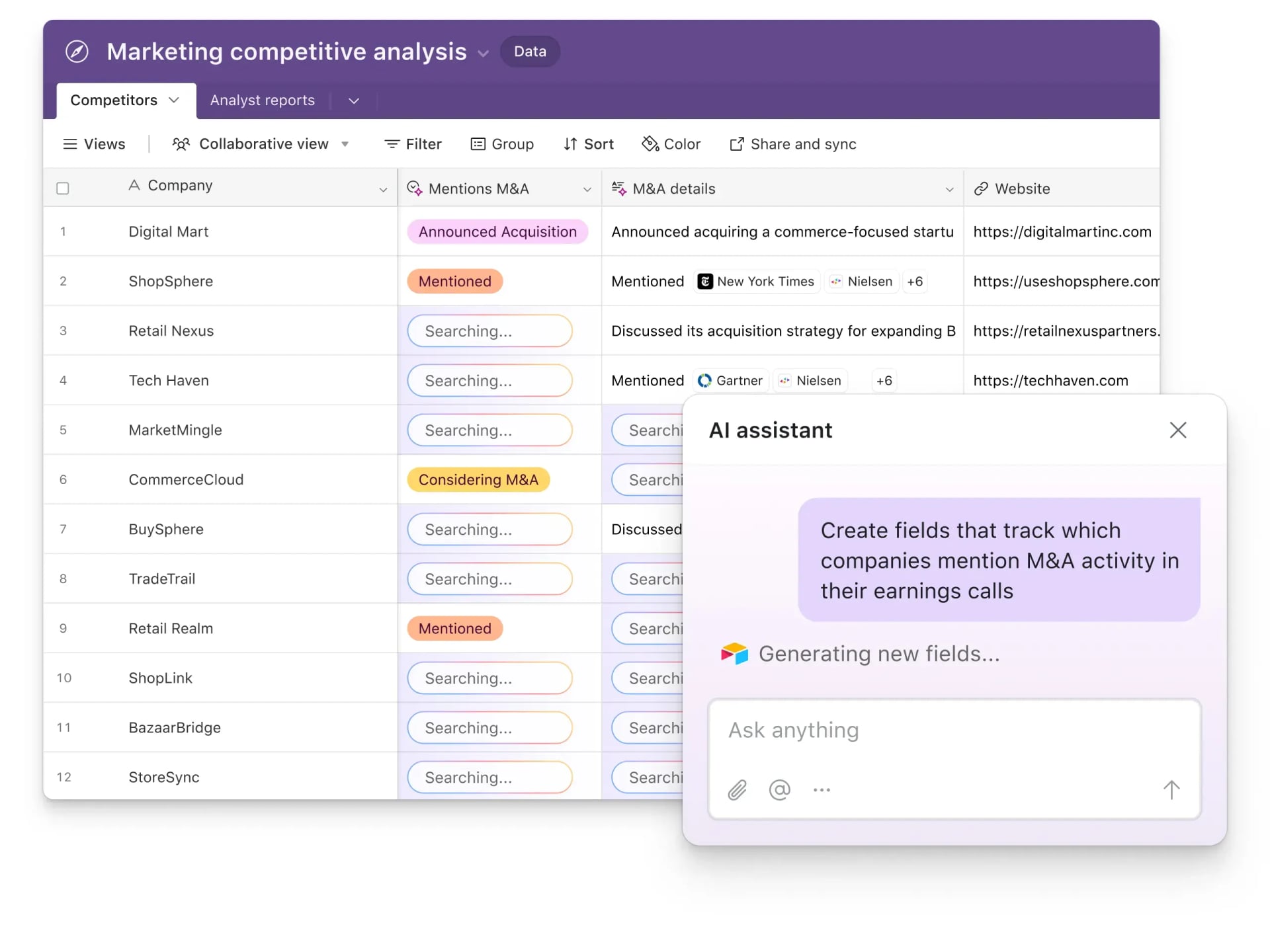
Airtable Productivity & Collaboration showing Productivity & Collaboration - The AI-native platform for building trusted AI a

Video Showcase

Rate this Tool

4.0 / 5based on 4 ratings

About Airtable

“The AI-native platform for building trusted AI apps at enterprise scale”

Airtable is a productivity & collaboration tool developed by Airtable (US) designed for product managers, business executives and marketing professionals. Airtable is a Data Analytics & Productivity solution for Product Managers, Executives, Marketers, and Entrepreneurs that enables no-code building of AI-native custom apps with conversational AI, embedded agents, and scalable automation. Pricing: Freemium, Enterprise. With over 22.1 million monthly visits, Airtable has established a significant user base. Airtable follows a freemium / subscription pricing model, with plans from a free plan up to $54/mo. It is available on Web App, Mobile App and API. Developer integration is supported through JavaScript/TypeScript SDKs. It competes in the same space as Notion AI, Coda and ClickUp. Airtable offers GDPR-compliant data handling and Global hosting. Explore more productivity & collaboration tools or browse all categories.

Airtable Snapshot

Key facts we track so you can judge fit before visiting the provider.

Best fit
Product Managers, Business Executives, Marketing Professionals +2 more
Platforms
Web App, Mobile App, API
Provider context
Airtable - US
Developer access
API documentation, JavaScript/TypeScript
Data handling
GDPR marked, Global hosting, Privacy policy linked
Evidence signals
22M monthly visits, 4.0 rating from 4 ratings, 109 community favorites +1 more

Before you choose Airtable

  • Confirm Airtable's current limits, renewal terms, and seat pricing on the official site.
  • Review privacy, retention, and data-processing terms before using sensitive data.
  • Test the integrations or API path against one real workflow before rollout.
  • Make sure the supported platform matches where your team actually works.

Listing data is compiled from structured provider information, public signals, submissions, and periodic checks where available. Treat this page as a shortlist aid, then verify pricing, compliance, and product limits with the provider before making a business-critical decision.

How Airtable Works

Understanding the core functionality and approach of Airtable.

Airtable bundles advanced features into clear subscription levels. It’s easy to upgrade or downgrade as teams grow or priorities shift. Monthly or annual plans for Airtable are easier to budget, but renewal terms and usage caps still matter.

Key Features

Explore what makes Airtable stand out.

Work anywhere with Airtable

Multi-platform support ensures everyone can use Airtable regardless of their device preference. Developers get JavaScript/TypeScript SDKs and a documented API; everyone else uses Airtable on Web App, Mobile App, and API.

Developer-friendly API

Rate limits and authentication are clearly documented for smooth implementation. Airtable is most useful when routine operations can be clearly defined and checked after execution.

Client libraries available

1 SDKs (e.g., JavaScript/TypeScript) help dev teams launch prototypes quickly.

Data protection standards

Role-based access and audit trails help satisfy governance requirements. The listing includes a GDPR compliance signal for Airtable, which is useful for early vendor screening.

Try before you commit

Spin up a proof-of-concept quickly to validate fit and adoption.

Automation-first workflows

Trigger-based flows keep work moving without extra check-ins.

Use Cases

Discover how different audiences leverage Airtable.

Business Executives

Work from anywhere

Collaboration features keep distributed teams aligned without constant meetings.

Product Managers

Product roadmap planning

Data-driven product decisions reduce guesswork and improve success rates. Dashboards in Airtable are useful when they expose metrics your team already reviews.

Product Managers

Automate repeatable work

Operations teams rely on Airtable to orchestrate tasks across departments.

FAQ about Airtable

What is Airtable and what does it do?

Airtable is The AI-native platform for building trusted AI apps at enterprise scale. Airtable is the AI-native platform for building, automating, and scaling custom business apps. With conversational app-building powered by Omni, AI agents that live inside your bases (Field Agents), and production-ready agentic capabilities, Airtable enables users to generate, deploy, and manage enterprise-grade applications rapidly—without code. The platform uniquely combines spreadsheet simplicity, database power, real-time collaboration, AI-driven workflow automation, and the ability to extract insights, automate work at scale, and synthesize data across sources in a secure, scalable environment accessible across all plans. Available on Web App, Mobile App, API, Airtable is designed to enhance productivity and deliver professional-grade productivity & collaboration capabilities.

How much does Airtable cost?

Airtable offers Freemium, Subscription pricing options. Free tier available ($0), Team plan $20/user/month (billed annually) or $24/user/month (billed monthly), Business plan $45/user/month (billed annually) or $54/user/month (billed monthly), Enterprise Scale custom pricing. Current estimates suggest pricing from Paid from $24 / month. You can start with a free tier to test the platform before committing to a paid plan. For the most current pricing details and plan comparisons, visit the official Airtable pricing page or contact their sales team for custom enterprise quotes. See also Free vs Paid AI Tools for guidance on choosing the right plan.

Is Airtable secure and compliant with data privacy regulations?

Airtable is GDPR compliant, ensuring your data is handled according to European data protection standards. Data is hosted in Global, providing transparency about where your information resides. For comprehensive details about data handling, encryption, and privacy practices, review their official privacy policy. Security and compliance are continuously updated to meet evolving industry standards.
What platforms does Airtable support?
Airtable is available on Web App, Mobile App, API. The web application provides full functionality directly in your browser without requiring downloads. Mobile apps enable you to work on-the-go with synchronized data across devices. API access allows developers to integrate Airtable capabilities directly into their own applications and workflows. This multi-platform approach ensures you can use Airtable wherever and however you work best.
How can I try Airtable before purchasing?
Airtable offers a demo version that lets you explore key features hands-on. The freemium model gives you access to essential features at no cost, with premium capabilities available through paid upgrades. Testing the platform before committing ensures it meets your specific requirements and integrates smoothly with your existing workflows. Support for Multiple languages, including English, German, French, Spanish, and Japanese makes it accessible to global users.
What file formats does Airtable support?
Airtable accepts Data can be imported in various formats including CSV, Excel, and JSON. as input formats, making it compatible with your existing files and workflows. Output is delivered in Users can export their data in formats like CSV and PDF for easy sharing and analysis., ensuring compatibility with downstream tools and platforms. This format flexibility allows seamless integration into diverse tech stacks and creative pipelines.
Who develops and maintains Airtable?
Airtable is developed and maintained by Airtable, based in US. Most recently updated in October 2026, the platform remains actively maintained with regular feature releases and bug fixes. This ongoing commitment ensures Airtable stays competitive and aligned with industry best practices.
How do I get access to Airtable?
Airtable is freely available to everyone without registration requirements. You can start using the platform immediately without going through lengthy approval processes. A demo version is also available for those who want to explore features before committing.
How is usage measured and billed in Airtable?
Airtable uses Projects, Storage as billing metrics. This usage model ensures you only pay for what you actually use, avoiding unnecessary overhead costs for features you don't need.
What deployment options does Airtable offer?
Airtable supports Cloud deployment configurations. Cloud-hosted options provide instant scalability without infrastructure management overhead. Choose the deployment model that best aligns with your technical requirements, security constraints, and operational preferences.

Stay updated with the latest news and insights about Airtable and the AI industry.

United Airlines Bans Third-Party AI Agents Like Meta's Muse and OpenAI's Dots From Booking Flights, Citing Security Risks and MileagePlus Misuse – united airlines
Industry News

United Airlines Bans Third-Party AI Agents Like Meta's Muse and OpenAI's Dots From Booking Flights, Citing Security Risks and MileagePlus Misuse

3 min read
United Airlines has banned unauthorized third-party AI agents from booking flights as of November 11, 2026, citing security risks and federal compliance. AI tools can display United flights but cannot complete transactions.
Read Article
OpenAI Launches 'Businesses in ChatGPT' with Verified AI Agents and Shopify Integration – openai
Product Launches

OpenAI Launches 'Businesses in ChatGPT' with Verified AI Agents and Shopify Integration

4 min read
OpenAI launched "Businesses in ChatGPT" with verified AI Business Agents and a Business Hub, allowing companies to manage their presence, publish product feeds, and engage with customers directly within ChatGPT. This includes Shopify integration and sponsored placements for ChatGPT Ads.
Read Article
Perplexity Launches Teammates: Always-On AI Agents for Enterprise Workflows – perplexity
Product Launches

Perplexity Launches Teammates: Always-On AI Agents for Enterprise Workflows

3 min read
Perplexity introduces Teammates, always-on AI agents for large-scale work, building on Perplexity Computer. This feature allows users to monitor progress in the Perplexity app and interact via Slack, requiring a Max plan subscription.
Read Article

Compare Similar Tools

See how Airtable stacks up against similar alternatives in the market.

Notion AI icon

Notion AI

The all-in-one AI workspace that takes notes, searches apps, and builds workflows where you work.

379
Jotform AI Agents icon

Jotform AI Agents

Turn conversations into completed forms and actions

157
Freemium
+1 more
Grammarly icon

Grammarly

Your AI writing partner for work

190
Freemium
+1 more
For tool providers

Keep Airtable's listing accurate

Providers can update product facts, pricing context, screenshots, and launch notes. Paid placements are labeled separately and do not replace editorial or data-quality review.

How to Evaluate Airtable

Compare Airtable with Notion AI, Coda, ClickUp and other alternatives before you decide. The goal is not to pick the most popular product; it is to find the tool that fits your actual workflow, risk level, and budget.

  1. Step 1Run the demo with one real product managers task, not a sample prompt.
  2. Step 2Model the full monthly cost at your expected usage, including seats, limits, and overages.
  3. Step 3Verify the integration path with your existing stack before you commit.
  4. Step 4Review privacy, retention, and compliance terms before using sensitive data.

Use the video walkthrough to check whether the interface matches the claims. For developer teams, inspect the JavaScript/TypeScript SDK. Review the API documentation for auth, rate limits, errors, and export behavior. For broader context, browse more productivity & collaboration tools for product managers, or compare this page against the category hub. New to AI tool evaluation? Start with AI Tool Navigator.

Share Airtable

Know someone who would find it useful? Send it along.

Report an Issue

Something wrong or missing about Airtable? Tell us and we will look into it.

AI Tool Consulting

Need a tool shortlist for a real business use case?

Get a structured 3-5 tool recommendation, pricing comparison, and implementation roadmap for your team.

Fixed-scope 500 EUR optionBased on Best-AI.org tool dataManual expert review
Get matched