Falconer logo - Productivity & Collaboration brand identity

Falconer (2026)

Expert Reviewed
by Dr. William BobosLast reviewed: Nov 2, 2026

The source of truth for high-speed teams

Visit website
Compare
Admin Verified
Favorites
0
Pricing
Free
Platform
Web App / API
Data status
Verified listing

Overview

Falconer is your company's single source of truth: a living context layer that connects your code, docs, messages, tasks, and the tools your team already loves. Connect your tools and Falconer maintains a complete, connected, and always current picture of how your company and product works. When code changes, the docs update without the manual upkeep. The...
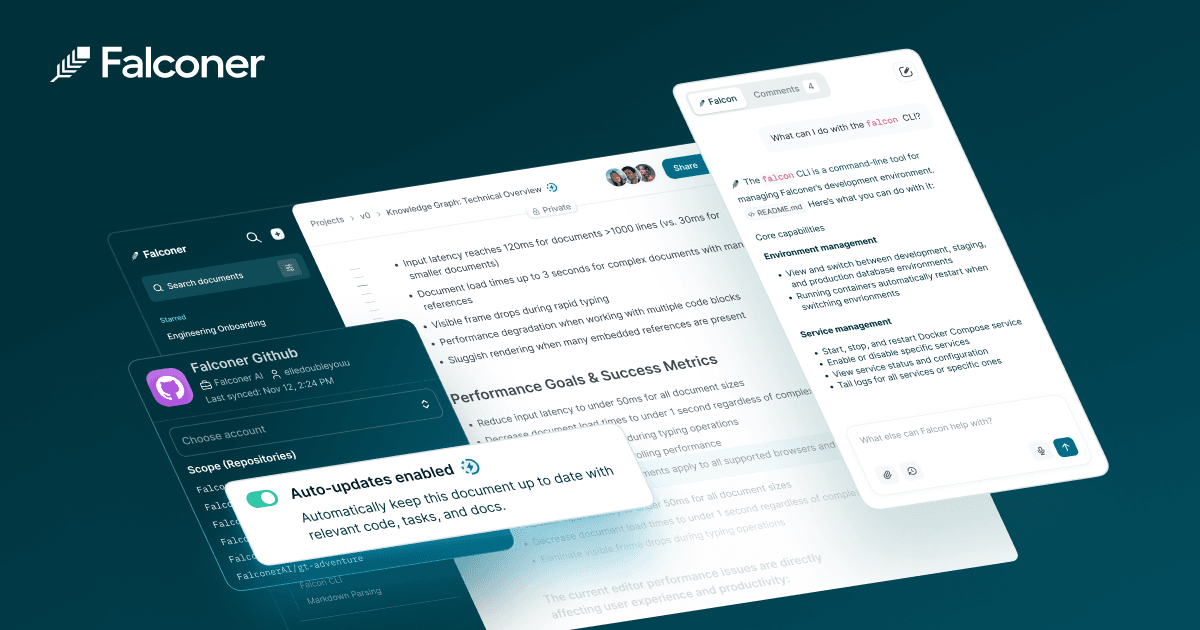
Falconer Productivity & Collaboration showing Productivity & Collaboration - The source of truth for high-speed teams

Rate this Tool

Be the first to rate this tool!

About Falconer

“The source of truth for high-speed teams”

Falconer is a productivity & collaboration tool developed by Falconer (US) designed for remote workers, product managers and business executives. Falconer is an AI powered knowledge platform for engineering teams that writes, updates, and organizes docs automatically—synced to your codebase and favorite tools. Free to start; Pro at $20/user/month. Built for fast growing techincal teams and everyone who depends on what they build. Falconer follows a free pricing model, with plans free of charge. It is available on Web App, API and CLI Tool. Developer integration is supported through JavaScript/TypeScript SDKs. Falconer integrates with Slack, GitHub, Granola, Linear, Gmail and 1 more. It competes in the same space as Notion AI, Confluence (Atlassian) and Glean. A free demo is available to evaluate Falconer before committing to a paid plan. Explore more productivity & collaboration tools or browse all categories.

Falconer Snapshot

Key facts we track so you can judge fit before visiting the provider.

Best fit
Remote Workers, Product Managers, Business Executives +3 more
Platforms
Web App, API, CLI Tool
Pricing signal
Free
Provider context
Falconer - US
Known integrations
Slack, GitHub, Granola, Linear, Gmail +1 more
Developer access
API documentation, JavaScript/TypeScript
Data handling
Privacy policy linked

Before you choose Falconer

  • Confirm Falconer's current limits, renewal terms, and seat pricing on the official site.
  • Review privacy, retention, and data-processing terms before using sensitive data.
  • Test the integrations or API path against one real workflow before rollout.
  • Make sure the supported platform matches where your team actually works.

Listing data is compiled from structured provider information, public signals, submissions, and periodic checks where available. Treat this page as a shortlist aid, then verify pricing, compliance, and product limits with the provider before making a business-critical decision.

How Falconer Works

Understanding the core functionality and approach of Falconer.

Falconer offers a no-cost plan so you can explore across Web App, API, and CLI Tool. Validate real workflows before you lock in budget or long-term contracts. Falconer was last updated on November 2, 2026, reflecting active development.

Key Features

Explore what makes Falconer stand out.

Device-agnostic access

Multi-platform support ensures everyone can use Falconer regardless of their device preference. Falconer embeds into Slack and Gmail workflows while offering full access via Web App, API, and CLI Tool.

RESTful API integration

RESTful API design follows industry standards for easy integration.

SDKs to accelerate build-out

Type-safe SDKs provide autocomplete and compile-time checks for faster development.

Try before you commit

Demo and trial environments let teams experience Falconer before committing.

Use Cases

Discover how different audiences leverage Falconer.

Product Managers

Startup-friendly tooling

Falconer scales with your business—start small and expand as revenue grows. Falconer plugs into Slack, GitHub, and Granola so data stays in sync.

Product Managers

Distributed team workflows

Cross-platform sync ensures work started on one device continues seamlessly on another.

FAQ about Falconer

What is Falconer and what does it do?

Falconer is The source of truth for high-speed teams. Falconer is your company's single source of truth: a living context layer that connects your code, docs, messages, tasks, and the tools your team already loves. Connect your tools and Falconer maintains a complete, connected, and always current picture of how your company and product works. When code changes, the docs update without the manual upkeep. The surface looks familiar: a docs editor and workspace your team actually wants to write in. What's underneath isn't—every doc and answer is connected to the real sources: the PR, the ticket, the decision. Ask questions, generate docs, write changelogs, diagram your architecture, file tickets—all grounded in what's actually true about your product. Falcon is the agent built into all of it. It knows your codebase, your decisions, your team. Prompt it in Slack or in the editor. Anyone on the team can tap into the depth of an engineer who's been there since day one. Built for technical teams and everyone who depends on what they build. Available on Web App, API, CLI Tool, Falconer is designed to enhance productivity and deliver professional-grade productivity & collaboration capabilities.

How much does Falconer cost?

Falconer offers Free pricing options. Go: pay as you go, free to start with 2,000 free credits (buy extra credits as needed). You can start with a free tier to test the platform before committing to a paid plan. For the most current pricing details and plan comparisons, visit the official Falconer pricing page or contact their sales team for custom enterprise quotes. See also Free vs Paid AI Tools for guidance on choosing the right plan.

Is Falconer secure and compliant with data privacy regulations?

Falconer takes data privacy seriously and implements industry-standard security measures. For comprehensive details about data handling, encryption, and privacy practices, review their official privacy policy. On-premise deployment options are available for organizations with strict data residency requirements. Security and compliance are continuously updated to meet evolving industry standards.
What platforms does Falconer support?
Falconer is available on Web App, API, CLI Tool. The web application provides full functionality directly in your browser without requiring downloads. API access allows developers to integrate Falconer capabilities directly into their own applications and workflows. This multi-platform approach ensures you can use Falconer wherever and however you work best.
How can I try Falconer before purchasing?
Falconer offers a demo version that lets you explore key features hands-on. A free plan is available with core functionality, perfect for individual users or small projects. Testing the platform before committing ensures it meets your specific requirements and integrates smoothly with your existing workflows.
Who develops and maintains Falconer?
Falconer is developed and maintained by Falconer, based in US. The tool was launched in 2026, and has since evolved through continuous updates and improvements. Most recently updated in November 2026, the platform remains actively maintained with regular feature releases and bug fixes. This ongoing commitment ensures Falconer stays competitive and aligned with industry best practices.
How do I get access to Falconer?
Falconer is requires user registration and authentication for access. Create an account through the official website to begin your onboarding process. A demo version is also available for those who want to explore features before committing.
How is usage measured and billed in Falconer?
Falconer uses Credits as billing metrics. Credit-based systems offer flexibility, allowing you to purchase credits in advance and consume them as needed. This usage model ensures you only pay for what you actually use, avoiding unnecessary overhead costs for features you don't need.
What deployment options does Falconer offer?
Falconer supports Cloud, OnPremise, API Only deployment configurations. Cloud-hosted options provide instant scalability without infrastructure management overhead. On-premise installations give organizations complete control over data residency and security policies. API-only access enables seamless integration into existing applications and custom workflows. Choose the deployment model that best aligns with your technical requirements, security constraints, and operational preferences.
Who is Falconer best suited for?
Falconer is primarily designed for Remote Workers, Product Managers, Business Executives and AI Enthusiasts. Professionals in productivity & collaboration find it invaluable for streamlining their daily tasks. Whether you need automation, creative assistance, data analysis, or communication support, Falconer provides valuable capabilities for multiple use cases and skill levels. Check out our developer guide for more recommendations.

Compare Similar Tools

See how Falconer stacks up against similar alternatives in the market.

Notion AI icon

Notion AI

The all-in-one AI workspace that takes notes, searches apps, and builds workflows where you work.

379
Google Antigravity icon

Google Antigravity

Build in the agent-first era

506
Freemium
+1 more
Cursor icon

Cursor

Your coding agent for building ambitious software

786
Freemium
+1 more
For tool providers

Keep Falconer's listing accurate

Providers can update product facts, pricing context, screenshots, and launch notes. Paid placements are labeled separately and do not replace editorial or data-quality review.

How to Evaluate Falconer

Compare Falconer with Notion AI, Confluence (Atlassian), Glean and other alternatives before you decide. The goal is not to pick the most popular product; it is to find the tool that fits your actual workflow, risk level, and budget.

  1. Step 1Run the demo with one real remote workers task, not a sample prompt.
  2. Step 2Model the full monthly cost at your expected usage, including seats, limits, and overages.
  3. Step 3Verify the integration path with your existing stack before you commit.
  4. Step 4Review privacy, retention, and compliance terms before using sensitive data.

For developer teams, inspect the JavaScript/TypeScript SDK. Review the API documentation for auth, rate limits, errors, and export behavior. For broader context, browse more productivity & collaboration tools for remote workers, or compare this page against the category hub. New to AI tool evaluation? Start with AI Tool Navigator.

Share Falconer

Know someone who would find it useful? Send it along.

Report an Issue

Something wrong or missing about Falconer? Tell us and we will look into it.

AI Tool Consulting

Need a tool shortlist for a real business use case?

Get a structured 3-5 tool recommendation, pricing comparison, and implementation roadmap for your team.

Fixed-scope 500 EUR optionBased on Best-AI.org tool dataManual expert review
Get matched